Karpathy has a famous philosophy when it comes to teaching AI:
"What I cannot create, I do not understand." (A quote he often borrows from Richard Feynman).
By stripping away millions of lines of highly optimized PyTorch and C++ code, he proves to everyone that there is no "black magic" inside a neural network. It isn't a brain; it's just basic high school calculus (the chain rule), some matrix multiplication, and a massive loop of trial and error. Writing it in 200 lines of pure Python is exactly as you said—a deliberate, brilliant stunt to make the "scary" math accessible to anyone who knows basic programming.
Neural Networks: Zero to Hero - YouTube
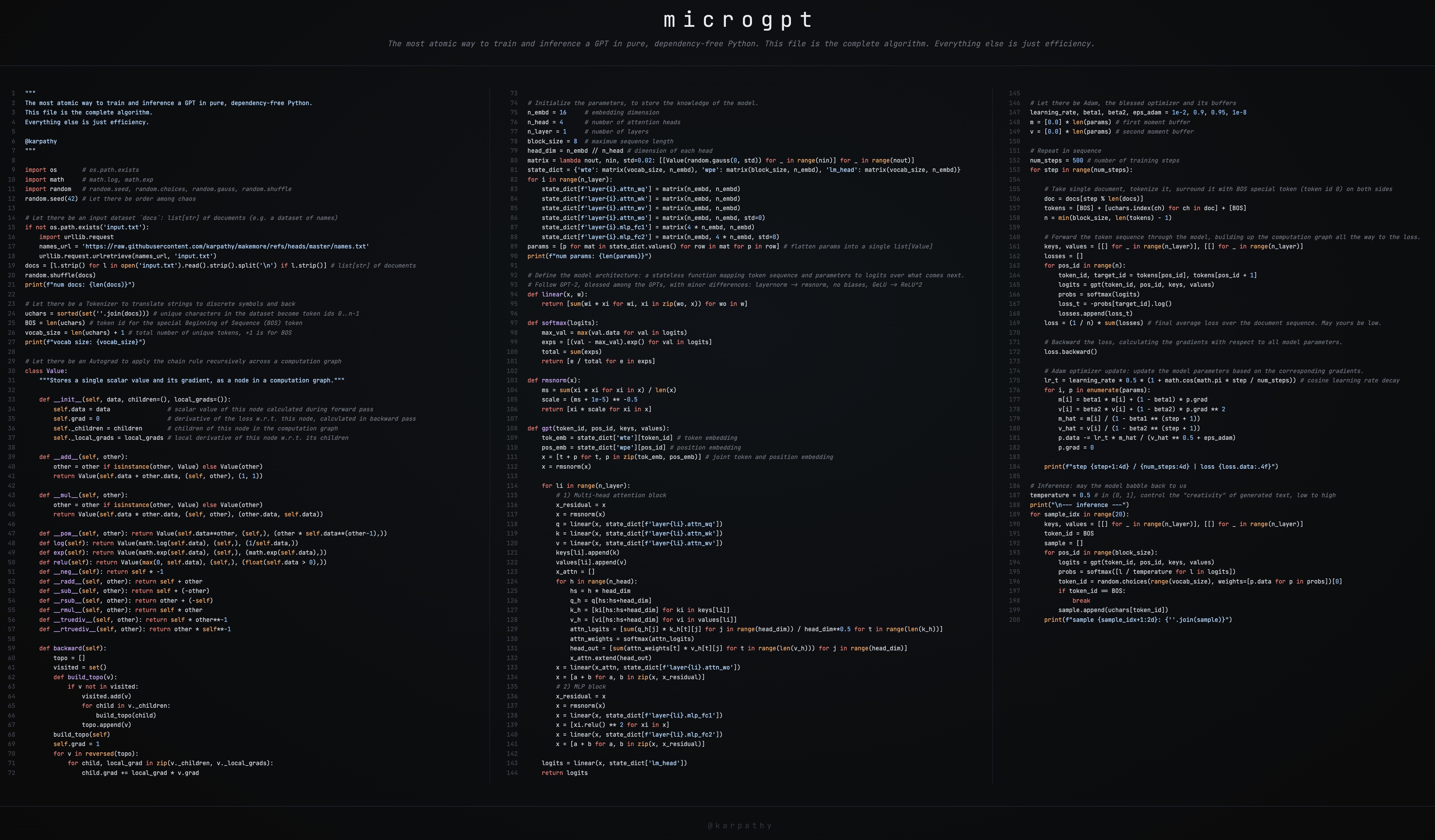
microgpt
- This GitHub gist has the full source code: microgpt.py
- It’s also available on this web page: https://karpathy.ai/microgpt.html
- Also available as a Google Colab notebook
Andrej Karpathy - YouTube
Code A MicroGPT With A Chief Data Scientist - YouTube
Show HN: Microgpt is a GPT you can visualize in the browser | Hacker News
microgpt visualizer https://microgpt.boratto.ca/
AI (Gemini)'s explanation
1. Does it have any dependencies?
os (for file path checking)[1] math (for log and exponential functions)[1] random (for initialization, shuffling, and sampling)[1] urllib.request (to download the dataset if it's not present)[1]
2. How efficient can it be?
A custom, scalar-based Autograd engine (similar to Karpathy's micrograd), meaning it tracks gradients for every single individual number rather than large matrices[ 1 ].Standard Python list objects and nested for loops instead of contiguous memory arrays[ 1 ].Zero hardware acceleration (no GPU, no vectorization/SIMD)[ 1 ].
Standard Python (CPython): Extremely slow. Taking roughly~713,000 microseconds (0.7s) per training sample [1 ].PyPy (Just-In-Time Compiler): Simply running the exact same Python script with PyPy yields a~2.4x speedup (~301,000 µs/sample)[1 ].Porting to Compiled Languages (C++ / Rust): By porting the same autograd tape logic to C++ (microgpt.cpp) or Rust (rust-microgpt), the overhead of Python is removed, yielding200x to 440x speedups (~1,620 µs/sample in Rust)[1 ].Vectorization & Explicit Math (EEmicroGPT / C with SIMD): When the scalar autograd overhead is stripped out (calculating the chain rule explicitly) and the code is mapped to raw CPU SIMD registers (like Apple's Neon/SME2), the execution time drops to~36.8 µs/sample [1 ].
If you'd like to check out the specific ports and discussions mentioned in comments without having to dig through the thread, here are the direct links and details from that comment section:
Requires names.txt in the working directory (the Karpathy names dataset, ~32K names).
All implementations train the exact same model on the same data. CPython, PyPy, and microgpt.cpp use the autograd Value class approach with batch=1 and f64. rust-microgpt uses the same autograd approach with batch=1 but f32. EEmicroGPT uses explicit forward/backward, batch=16, f32.
Because this is a minimalist educational script, there is no code to save or export the model weights to your hard drive (like a .pt, .h5, or .safetensors file). Everything happens entirely in your computer's RAM. Once the script finishes running and prints its final output, the program closes and the trained model is instantly deleted from memory. If you want to use it again, you have to train it from scratch.
2. How long does it take?
It only runs for 1,000 steps (processing one word/name at a time). The network is only 1 layer deep with a width of 16 dimensions. The dataset it trains on is just a text file of 32,000 common human names (which it will automatically download from the internet the first time you run it).
3. How is the model used when produced?
After the 1,000 training steps finish, the script switches from "training mode" to "generating mode." It feeds an invisible "start" token into the neural network it just built in your RAM. The model predicts the first letter of a name, feeds that letter back into itself, predicts the next letter, and so on, until it decides the name is finished. It does this 20 times to generate 20 brand-new, completely hallucinated names. It prints these 20 names to your terminal screen. The script ends.
1. What is the model actually doing during the Training Phase?
Tokenization: It takes a single document from the dataset (e.g., the name "emma") and wraps it in a special BOS (Beginning of Sequence) token. It becomes a sequence of integers representing: [BOS, e, m, m, a, BOS]. The Forward Pass: It feeds this sequence into the neural network one letter at a time. At each letter, the model calculates probabilities (logits) for what it thinks the next letter will be. Calculating the "Loss": The script compares the model's guess to the actual next letter. It calculates a "loss" score (cross-entropy). If the model was highly confident that "m" comes after "e", the loss is low. If it guessed "z", it is "surprised", and the loss is high. The Backward Pass (Autograd): The script calls a loss.backward() function. This triggers calculus (the chain rule) to flow backwards through the entire network. It calculates the "gradient" for every single parameter—essentially asking: "If I nudge this specific number up or down a tiny bit, will the overall surprise (loss) decrease?" The Optimizer Update (Adam): Finally, the Adam optimizer steps in. It takes those gradients and physically changes the thousands of weights in the model's memory so that the next time it sees "e", it is slightly more likely to predict "m".
2. What is the model doing during the Inference Phase?
The Seed: The script feeds a single BOS token into the network, which signals to the model: "Begin a new name." Predicting & Sampling: The model uses its trained parameters to spit out a probability distribution of all 26 letters. The script then randomly samples a letter from that distribution. (If "a" has a 20% probability and "z" has a 1% probability, it's more likely to pick "a", but it's not guaranteed). The Autoregressive Loop: Let's say it picked "k". It prints "k" to your screen, and then feeds "k" back into itself as the new input. Now it predicts what comes after "k". It picks "a". It feeds "a" back in. Stopping: It loops this cycle until the model eventually predicts the BOS token again, which means "I am done with this word."
3. Can it be called for different "inference"?
If you lower it to 0.1, the model becomes very conservative. It will only pick the absolute most likely next letters, resulting in very safe, normal, but repetitive names. If you raise it to 1.0 or higher, the probability distribution flattens out. The model becomes chaotic and highly "creative," resulting in bizarre and alien-sounding outputs.

No comments:
Post a Comment