The app store model faces a new challenger: AI-generated UI "Apps"
Three major AI providers, Google, OpenAI, and Anthropic,
are standardizing how agents can dynamically create user interfaces on the fly.
How it works: AI applications (typically chat or search interfaces) generate structured metadata, JSON or similar formats, as part of their response to user prompts. Client-side libraries then render this metadata into native UI components. The user sees a form, chart, or interactive widget; the agent sees a simple data structure it can produce programmatically.
What's new isn't the technique, it's the standardization.
Each provider has introduced their own approach:
| Provider | Standard | Approach |
|---|---|---|
| A2UI | Custom declarative JSON → native widgets | |
| OpenAI | Apps SDK | MCP-based apps inside ChatGPT |
| Anthropic + OpenAI | MCP Apps | UI extension for Model Context Protocol |
This standardization means developers can build once and deploy across multiple AI hosts, while agents gain a common "vocabulary" for expressing UI intent.
The future is all about AI-generated user interfaces (says Google) - YouTube by
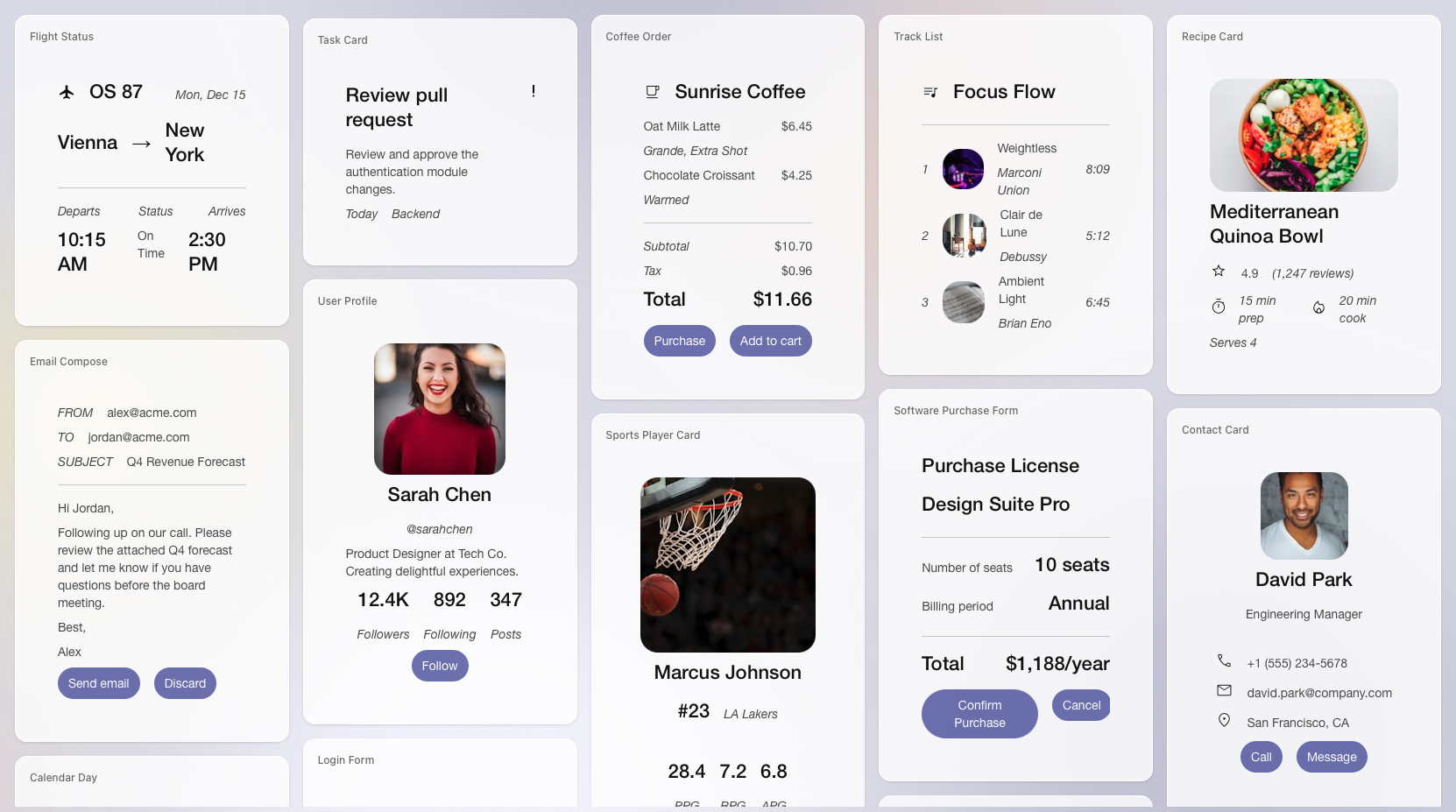
This extension addresses one of the most requested features from the MCP community and builds on proven work from MCP-UI and OpenAI Apps SDK - the ability for MCP servers to deliver interactive user interfaces to hosts.
MCP Apps Extension introduces a standardized pattern for declaring UI resources, linking them to tools, and enabling bidirectional communication between embedded interfaces and the host application."
Summary by Gemini
Recent developments in late 2024 and 2025 have crystallized a new paradigm often called "AI UI" or Generative UI. This is the shift from static, pre-built user interfaces to dynamic interfaces generated on-the-fly by AI agents to match a user's specific intent.
The three terms you listed—A2UI, OpenAI Apps SDK, and MCP Apps—are the competing and complementary standards emerging to build this future.
1. The Big Picture: What is AI UI?
Traditionally, apps have fixed buttons and menus. If you want to book a flight, you navigate a static form. In AI UI, an AI agent (like ChatGPT or Claude) determines what you need and generates the interface in real-time.
- Old Way: You scroll through a list of 50 tools to find the "Calendar" button.
- AI UI Way: You say "Schedule a meeting," and the AI generates a date-picker widget right in the chat.
2. A2UI (Agent-to-User Interface)
"The Native, Declarative Standard"
- Origin: An open-source project initiated by Google.
- Core Concept: A2UI allows an AI agent to send a "blueprint" (a JSON file) of a UI to your device, which your device then builds using its own native components (like native iOS buttons or Android sliders).
- How it works:
- The agent does not send code (like HTML or JavaScript) to be executed.
- Instead, it sends a secure list of components (e.g.,
type: "button", label: "Book Now"). - The client application (your phone or browser) renders this safely.
- Why it matters: It is highly secure because no arbitrary code is running. It also ensures the UI looks perfectly consistent with the app you are using (e.g., a dark-mode iOS app will render a dark-mode iOS button).
3. OpenAI Apps SDK
"Apps Inside ChatGPT"
- Origin: OpenAI (built on top of the MCP standard).
- Core Concept: A framework that lets developers build mini-applications that run directly inside the ChatGPT interface.
- How it works:
- It extends the Model Context Protocol (see below) to include UI capabilities.
- Developers define "widgets" (interactive cards, charts, dashboards) that the AI can choose to display during a conversation.
- Unlike A2UI's strictly native approach, this often leverages web technologies to render rich, app-like experiences inside the chat window.
- Why it matters: It turns ChatGPT from a chatbot into a platform/OS. Instead of just talking, you can use a "Spotify App" or "Jira App" inside the chat to perform complex tasks with visual feedback.
4. MCP Apps (Model Context Protocol Apps)
"The Universal Standard for UI-as-a-Resource"
- Origin: An extension of the Model Context Protocol (MCP), originally championed by Anthropic and widely adopted by the industry.
- Core Concept: MCP provided a standard way for AI models to connect to data (like reading a database). MCP Apps adds a standard way for those tools to return User Interfaces as a resource.
- How it works:
- It treats a UI like a file or a web page. A tool can return a
ui://URI, which the AI client (like Claude Desktop or an IDE) fetches and displays. - It typically uses sandboxed technologies (like iframes) to show these interfaces securely.
- It treats a UI like a file or a web page. A tool can return a
- Why it matters: It solves the "fragmentation" problem. A developer can build one "MCP App" (e.g., a stock ticker tool) and it should theoretically work in Claude, ChatGPT, Cursor, or any other AI client that supports the standard.
Summary Comparison
| Feature | A2UI | OpenAI Apps SDK | MCP Apps |
|---|---|---|---|
| Primary Philosophy | Native First: Sends a JSON "blueprint"; client builds the UI. | Platform First: Builds apps specifically for the ChatGPT ecosystem. | Resource First: Treats UI as a fetchable resource (like a webpage). |
| Rendering | Uses the host app's native widgets (Swift, Kotlin, Flutter components). | Renders web-based widgets/cards inline within the chat. | Often uses sandboxed web content (HTML/iframes) or standard templates. |
| Security | High (No executable code sent). | High (Managed by OpenAI's sandbox). | High (Sandboxed isolation). |
| Best For... | Mobile apps and deeply integrated agents where "look and feel" matters. | Developers wanting to sell/distribute tools to ChatGPT's massive user base. | Tool builders who want their tool to work across any AI model (Claude, OpenAI, etc.). |
Summary by Claude
These appear to be emerging concepts in the AI interface/application space. Let me break down what I know and search for current information:Now I have enough context. Let me explain these three concepts:
A2UI (Agent-to-User Interface)
A2UI is a declarative UI protocol for agent-driven interfaces created by Google (just announced 3 days ago, v0.8 preview). The core problem it solves: how can AI agents safely send rich UIs across trust boundaries? Instead of text-only responses or risky code execution, A2UI lets agents send declarative component descriptions that clients render using their own native widgets.
Key characteristics:
- Security: No iframes or arbitrary code execution. The client renders with its own UI framework, inheriting app styling, accessibility, and performance.
- The agent sends a description of the component tree and data model, and the client application maps those to its native widgets—web components, Flutter widgets, React, SwiftUI, etc.
- LLM-Friendly: Flat component list with ID references that's easy to generate incrementally, correct mistakes, and stream.
Think: agent says "render a booking form with these fields" in JSON, your app renders it natively in your design system.
OpenAI Apps SDK
OpenAI's Apps SDK enables developers to build apps that live inside ChatGPT. Apps appear in conversation naturally and include interactive interfaces you can use right in the chat.
What it does:
- The Apps SDK builds on the Model Context Protocol (MCP)—so it's MCP-based under the hood
- With the Apps SDK, you get the full stack: connect your data, trigger actions, render a fully interactive UI
- Pilot partners include Booking.com, Canva, Coursera, Figma, Expedia, Spotify, Zillow
This is OpenAI's play for distribution—you build once, and your app reaches ChatGPT's 800M weekly users.
Related: OpenAI also released AgentKit, which includes Agent Builder (visual canvas for multi-agent workflows), ChatKit (embeddable chat UI toolkit), and Connector Registry. The Agents SDK (separate from Apps SDK) is their lightweight framework for building agentic AI apps with primitives like Agents, Handoffs, Guardrails, and Sessions.
MCP Apps
The MCP Apps Extension (SEP-1865) standardizes support for interactive user interfaces in the Model Context Protocol. It introduces a pattern for declaring UI resources, linking them to tools, and enabling bidirectional communication between embedded interfaces and the host application.
The problem it addresses: Currently, MCP servers are limited to exchanging text and structured data with hosts. While this works well for many use cases, it creates friction when tools need to present visual information or gather complex user input.
How it works:
- UI templates are resources with the
ui://URI scheme, referenced in tool metadata - The initial spec supports only text/html content rendered in sandboxed iframes with restricted permissions
- All UI-to-host communication goes through loggable JSON-RPC
The SEP was authored by MCP Core Maintainers at OpenAI and Anthropic, together with the MCP-UI creators.
How They Relate
| A2UI | OpenAI Apps SDK | MCP Apps | |
|---|---|---|---|
| Who | OpenAI | Anthropic + OpenAI joint | |
| Scope | Protocol for agent-generated UI | Full app platform in ChatGPT | UI extension for MCP |
| Rendering | Native widgets (no iframe) | Full interactive UI | Sandboxed iframes |
| Transport | Works with A2A, AG-UI | Built on MCP | Part of MCP spec |
A2UI and AG-UI/CopilotKit work well together—A2UI is a generative UI specification while AG-UI is the agent↔user interaction protocol connecting frontend to backend.
These are all part of the emerging "agentic UI" layer—the recognition that agents need to go beyond text responses to deliver rich, interactive experiences. Given your work with MCP clients/servers, the MCP Apps extension is probably most directly relevant to you.
Visual Overview by Claude
AI UI Protocols: A2UI, OpenAI Apps SDK, and MCP Apps
A comprehensive guide to the emerging standards for agent-driven user interfaces.
Executive Summary
As AI agents move beyond text-only responses, three major approaches have emerged for delivering rich, interactive UIs:
| Protocol | Creator | Key Approach | Rendering |
|---|---|---|---|
| A2UI | Declarative JSON → Native widgets | No iframe, native rendering | |
| OpenAI Apps SDK | OpenAI | Full-stack apps in ChatGPT | Built on MCP |
| MCP Apps | Anthropic + OpenAI | UI extension for MCP | Sandboxed iframes |
How They Fit Together

A2UI (Agent-to-User Interface)
What It Is
A2UI is a declarative UI protocol for agent-driven interfaces, created by Google and released in December 2024 (v0.8 preview). It solves a fundamental problem: how can AI agents safely send rich UIs across trust boundaries?
Instead of text-only responses or risky code execution, A2UI lets agents send declarative component descriptions that clients render using their own native widgets. It's like having agents speak a universal UI language.
Key Characteristics
- Security First: No arbitrary code execution. The client maintains a catalog of trusted, pre-approved UI components, and the agent can only request components from that catalog.
- Native Feel: No iframes. The client renders with its own UI framework, inheriting app styling, accessibility, and performance.
- Portability: One agent response works everywhere. The same JSON renders on web (Lit/Angular/React), mobile (Flutter/SwiftUI/Jetpack Compose), and desktop.
- LLM-Friendly: Flat component list with ID references that's easy to generate incrementally, correct mistakes, and stream.
- Framework-Agnostic: Agent sends abstract component tree; client maps to native widgets.
Architecture

Message Flow Example

Example Payload
{
  "components": [
    {
      "id": "card-1",
      "type": "Card",
      "children": ["header-1", "form-1", "button-1"]
    },
    {
      "id": "header-1",
      "type": "Text",
      "content": "Book a Table"
    },
    {
      "id": "form-1",
      "type": "TextField",
      "label": "Party Size",
      "inputType": "number"
    },
    {
      "id": "button-1",
      "type": "Button",
      "text": "Confirm Booking",
      "action": "submit"
    }
  ]
}
When to Use A2UI
✅ Good for:
- Agent-generated UI across trust boundaries
- Multi-agent systems with standard protocol
- Cross-platform apps (one agent, many renderers)
- Security-critical applications (declarative data, no code execution)
- Brand consistency (client controls styling)
❌ Not ideal for:
- Static websites (use HTML/CSS)
- Simple text-only chat (use Markdown)
- Remote widgets not integrated with client (use iframes/MCP Apps)
Resources
- Website: a2ui.org
- GitHub: github.com/google/A2UI
- Status: v0.8 Public Preview, Apache 2.0 licensed
OpenAI Apps SDK
What It Is
The OpenAI Apps SDK enables developers to build apps that live inside ChatGPT. These apps appear naturally in conversation—you can discover them when ChatGPT suggests one, or call them by name. Apps respond to natural language and include interactive interfaces you can use right in the chat.
The Apps SDK is built on the Model Context Protocol (MCP), making it an open standard that others can implement.
Key Characteristics
- Distribution: Reach ChatGPT's 800M+ weekly users
- Contextual Discovery: Apps appear when relevant to the conversation
- Interactive UI: Full interfaces rendered in chat, not just text
- MCP-Based: Built on the open Model Context Protocol
- Full Stack: Connect data, trigger actions, render UI
Architecture

Message Flow Example

Related: AgentKit & Agents SDK
OpenAI offers additional tools for building agents:
AgentKit includes:
- Agent Builder: Visual canvas for creating and versioning multi-agent workflows
- ChatKit: Toolkit for embedding customizable chat-based agent experiences
- Connector Registry: Central admin panel for managing data sources across workspaces
Agents SDK (separate from Apps SDK):
- Lightweight framework for building agentic AI apps
- Core primitives: Agents, Handoffs, Guardrails, Sessions
- Built-in tracing for visualization and debugging
- Available in Python and TypeScript
Launch Partners
- Booking.com
- Canva
- Coursera
- Figma
- Expedia
- Spotify
- Zillow
Resources
- Apps SDK Docs: platform.openai.com/docs
- Agents SDK: openai.github.io/openai-agents-python
- AgentKit: openai.com/index/introducing-agentkit
MCP Apps
What It Is
MCP Apps is a proposed extension (SEP-1865) to the Model Context Protocol that standardizes support for interactive user interfaces. It was authored jointly by MCP Core Maintainers at OpenAI and Anthropic, along with the MCP-UI community.
The extension addresses a key limitation: MCP servers are currently limited to exchanging text and structured data. When tools need to present visual information or gather complex user input, this creates friction.
Key Characteristics
- UI Templates as Resources: Templates use the
ui://URI scheme - Tool Metadata Linking: Tools reference their UI via
_meta.ui/resourceUri - Sandboxed Rendering: HTML content runs in sandboxed iframes with restricted permissions
- Bidirectional Communication: UI-to-host messaging via JSON-RPC over postMessage
- Security Layers: Predeclared templates, auditable messages, user consent for tool calls
Architecture

Message Flow Example

Example: Registering a UI Template
// Server registers UI resource
{
  uri: "ui://charts/bar-chart",
  name: "Bar Chart Viewer",
  mimeType: "text/html+mcp"
}

// Tool references it in metadata
{
  name: "visualize_data_as_bar_chart",
  description: "Plots data as a bar chart",
  inputSchema: {
    type: "object",
    properties: {
      series: { type: "array", items: { ... } }
    }
  },
  _meta: {
    "ui/resourceUri": "ui://charts/bar-chart"
  }
}
Security Model
MCP Apps addresses security through multiple layers:
- Iframe Sandboxing: All UI content runs in sandboxed iframes with restricted permissions
- Predeclared Templates: Hosts can review HTML content before rendering
- Auditable Messages: All UI-to-host communication goes through loggable JSON-RPC
- User Consent: Hosts can require explicit approval for UI-initiated tool calls
The initial specification supports only text/html content. External URLs, remote DOM, and native widgets are explicitly deferred to future iterations.
Resources
- Proposal: blog.modelcontextprotocol.io/posts/2025-11-21-mcp-apps
- MCP Spec: modelcontextprotocol.io
- Status: SEP-1865 proposal, under development
Comparison: When to Use What
| Scenario | Recommended | Why |
|---|---|---|
| Building apps for ChatGPT users | OpenAI Apps SDK | Direct integration, 800M user reach |
| Cross-platform native UI | A2UI | One JSON → web, mobile, desktop |
| Adding UI to existing MCP server | MCP Apps | Standard extension, works with Claude/ChatGPT |
| Security-critical enterprise | A2UI | No code execution, declarative only |
| Quick prototypes | MCP Apps | HTML templates, familiar web tech |
| Multi-agent orchestration | A2UI + A2A | Designed for agent-to-agent communication |
| React/frontend focus | AG-UI + CopilotKit | State sync, A2UI compatible |
The Bigger Picture
These protocols represent the industry's recognition that agents need to go beyond text. The fragmentation you see (three different approaches from Google, OpenAI, and Anthropic+OpenAI) is typical of an emerging standard—expect consolidation over time.
Key trends to watch:
- MCP as the transport layer: Both OpenAI Apps SDK and MCP Apps build on MCP
- A2UI for native rendering: Google's approach may win for cross-platform native apps
- Interoperability: A2UI and AG-UI are already compatible; more bridges will emerge
- Security patterns: All three prioritize security differently (no-code vs sandbox vs consent)
The Agentic AI Foundation (launched by Linux Foundation with Anthropic, Block, OpenAI, Amazon, Google, Microsoft, Cloudflare, and Bloomberg) will likely drive standardization of these protocols.
Quick Reference
A2UI
Agent → Declarative JSON → Client Renderer → Native Widgets
OpenAI Apps SDK
User → ChatGPT → MCP → Your Server → Interactive UI in Chat
MCP Apps
Tool → ui:// Template → Sandboxed iframe → postMessage ↔ Host
Last updated: December 2024
No comments:
Post a Comment